User Mapping on macOS with Mosyle
Map macOS users in Mosyle to Cyberhaven using a custom MDM configuration profile. Cyberhaven uses the user's email address as a unique identifier for mapping.
Before you begin
- Ensure target devices are assigned to Mosyle Device Users with a registered email address.
- Copy the mobileconfig below into a text editor and save it as
Cyberhaven-Mosyle-UserMapping.mobileconfig.
Step 1: Deploy the MDM profile
- Log in to the Mosyle Admin Console with permissions to create Management Profiles.
- Go to Management > Management Profiles > Certificates/Custom Profiles.
- Click Add New Profile and provide a unique profile name.
- Upload
Cyberhaven-Mosyle-UserMapping.mobileconfig(contents below). - Select Enable Variables for this Profile.
- Choose the appropriate Profile Assignment and keep Profile Scope set to System (Default).
- Click Save.
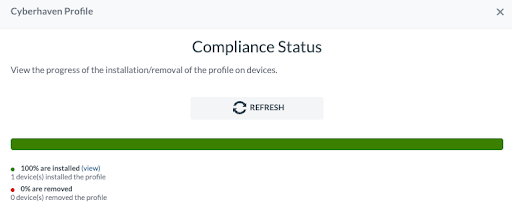
- Confirm the Compliance Status shows successful deployment before proceeding.
<?xml version="1.0" encoding="UTF-8"?>
<!DOCTYPE plist PUBLIC "-//Apple//DTD PLIST 1.0//EN" "http://www.apple.com/DTDs/PropertyList-1.0.dtd">
<plist version="1.0">
<dict>
    <key>PayloadContent</key>
    <array>
        <dict>
            <key>PayloadDisplayName</key>
            <string>Cyberhaven User Mapping</string>
            <key>PayloadIdentifier</key>
            <string>io.cyberhaven.lightbeam.66ECCE2B-09FA-4890-9A15-CF9C03803736</string>
            <key>PayloadType</key>
            <string>io.cyberhaven.lightbeam</string>
            <key>PayloadUUID</key>
            <string>66ECCE2B-09FA-4890-9A15-CF9C03803736</string>
            <key>PayloadVersion</key>
            <integer>1</integer>
            <key>mdm_username</key>
            <string>%Email%</string>
        </dict>
    </array>

    <key>PayloadDisplayName</key>
    <string>Cyberhaven User Mapping Profile</string>

    <key>PayloadIdentifier</key>
    <string>com.mosyle.profile.custom.cyberhaven-user-mapping</string>

    <key>PayloadScope</key>
    <string>System</string>
    <key>PayloadType</key>
    <string>Configuration</string>
    <key>PayloadUUID</key>
    <string>deb6d422-7700-47cb-86ca-9624ce666b37</string>
    <key>PayloadVersion</key>
    <integer>1</integer>
</dict>
</plist>
Step 2: Verify user mapping on a device
- On a device where the profile is deployed, run:
defaults read /Library/Managed\ Preferences/io.cyberhaven.lightbeam
- Confirm the
mdm_usernamefield shows the device user's email address.
Example output:
{
  PayloadUUID = "deb6d422-7700-47cb-86ca-9624ce666b37";
  backend =   {
    dlp_url = "https://test.cyberhaven.io";
    installer_token = "eyJhbGcviHRxNWOHzmOs6go_tw.....";
    url = "https://test.cyberhaven.io";
  };
  mdm_username = "clu@cyberhaven.eu";
  use_system_extension = 0;
  version = "2.0.5";
}